
What is Genspark AI? It can be said in one word that it is an all-in-one generative AI workspace that contains many features. This workspace holds different features for multiple uses, like office use and writing purpose also provides different tools that work with a smart agent.
Read this full overview about Genspark AI, where you will get to know about its uses, features, and why it is a unique workspace.
Table of Contents
What Is Genspark AI?
Genspark AI is an all-in-one workspace that assists with multiple types of projects. It can handle many kinds of work, and things get done in one place. If you belong to an office, you can manage emails, set meetings, or set up projects in one workspace. Also, writers can turn complex content into something easy to understand. It also helps developers to create multiple codes.
The Super Agent does the work and presents the result as a Sparkpage of Genspark AI, which is built into a single, custom Sparkpage that works to meet the requirements.
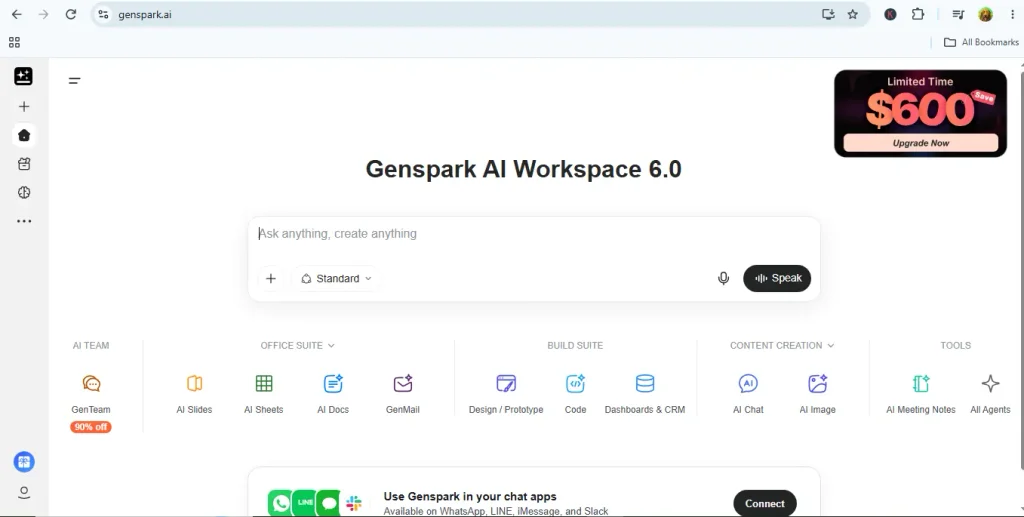
How Does Genspark AI Work?
Genspark AI combines several AI models and tools in one platform that work on a daily basis. It works based on the requirements. Follow the steps to better understand the process.
Step 1: User Prompt And Intent Analysis
- The first step: Type your request in the prompt box, which should be used for this purpose.
- Genspark takes your prompt apart. It figures out what you mean at a high level. Then it creates sub-questions from different angles. It looks at pricing, product details, likely upsides and downsides, and any recent updates.
Step 2: Parallel Autonomous Search
- Genspark deploys specialized AI Agents in parallel.
- Rather than checking a single page at a time, a set of smaller agents looks across the web at the same time. Each one covers a different area, which helps reduce one-sided results. This setup also aims to pull newer information, not old material.
Step 3: Data Filtering, Fact-Checking & Bias Reduction
- The system collects the search results. Then it removes the pages that look weak or fake. It also cuts out SEO spam. It avoids pages that point back to the same source over and over.
- Cross-checks the results as they derive from multiple credible sources so that you can minimize hallucinations.
Step 4: Synthesis & Sparkpage Generation
- Genspark does not just show raw links. It pulls the results together and builds a custom page. People can view it as a Sparkpage. Depending on what you ask for, it may show up as an AI Doc, an AI Slide, or an AI Dashboard.
- The content will be structured following the bullet points, important tables, and key takeaways
Step 5: Visual & Asset Creation
- Where there are visual requirements, Genspark AI is used to generate images, videos, diagrams, or charts to support the concepts of the structured text.
Step 6: Interactive Refinement & Export
- Open the workspace you just made. Check what shows up there. Review the result and ask the agent to adjust specific parts or make small changes.
- You can redo one step too, if needed. For example, update the chart look. When you are done, share the page in other formats. Export it as a PDF. Or save it as slides or as a document.
Key Features of Genspark AI
1. Mixture-of-Agents routing
The most distinctive factor that makes the difference between Genspark and other AI tools and workspaces is the included Super Agent that combines several different AI agents. It does not rely on a single one; rather, it works with multiple AI agents. It orchestrates multiple frontier models and more than 80 integrated tools, assigning each step to whichever fits best. Watch the demo.
2. Sparkpages
Genspark presents most of its answers in Sparkpages format, where it can provide the answers it generates most often. Instead of a plain chatbot reply, you get a structured mini-report with citations, follow-up options, and an embedded copilot. You can edit sections, ask the copilot to expand a topic, or share the page by link.
3. AI phone calls
Reviewers say this is the strangest feature. Genspark can make actual phone calls using AI voices that sound human. It can handle restaurant bookings and business questions. The call can go back and forth in a conversation, not just play a fixed script. See how this tool is useful in providing such offers.
4. AI Slides that need little prompting
Where it hits? The slides that Gemspark usually uses are editable. Whereas other AI tools provide structure that is not editable.
5. Blended multi-model chat
AI Chat merges results from ChatGPT, Claude, and Gemini. Then it runs a review step to keep the best parts from each one.
6. Genspark Claw (newest)
A new generation feature that was launched in March 2026, which works on its own cloud computer and takes instructions through WhatsApp, Telegram, Slack, and Teams. You delegate from your phone and come back to a finished result.
7. Wide Creative Toolkit
You can make images with FLUX or Gemini Imagen. You can also create videos with Sora, Kling, or Veo. If you need help with your files, try AI Drive to store and sort them.
Who Should Use Genspark AI?
This works well if you have to make your first draft fast for lots of different tasks. One reviewer said it fits small business owners, people building their company alone, and marketing generalists. They can draft decks, comparison lists, and topic summaries quickly. They also do not have to swap between separate AI services just to do it.
Good use cases include
- Turning a research question into a cited report
- Building a client presentation from a short brief
- Creating a spreadsheet or lightweight dashboard from one prompt
- Prototyping a simple web page or tool
Is Genspark AI Costly?
We cannot say in one sentence that it’s a fair deal, but yes, it depends on how you use it and which plan you compare it to. Compared strictly on base monthly prices, Genspark AI is slightly more expensive on its basic paid plan, but significantly broader in what it replaces. Check the pricing before adding it to your favorites.
| Plan | Monthly Billing | Annual Billing | Credits & Monthly Storage |
| Free | $0 | $0 | • 100 credits/day • Minimal storage |
| Plus | $24.99/mo | $239.99/yr (~$19.99/mo) | • 10,000 credits/mo • 50 GB AI Drive |
| Pro | $249.99/mo | $2,399.99/yr (~$199.99/mo) | • 125,000 credits/mo • 1 TB AI Drive |
| Team | $30/seat/mo | Custom / Invoiced | • 12,000 credits/seat/mo • 60 GB storage/seat |
Genspark AI vs ChatGPT and Perplexity
People usually say Perplexity is good at search that shows sources. They say ChatGPT is strong for chats and general thinking. Genspark’s main strength is giving complete deliverables. See the key difference in the table below.
| Feature / Aspect | Genspark AI | ChatGPT | Perplexity AI |
| Primary Focus | All-in-One Content Workspace | Reasoning & Execution | Search & Answer Engine |
| Base Entry Price | $24.99/mo (Plus) | $20/mo (Plus) | $20/mo (Pro) |
| Billing Model | Credit-based system across all AI tools | Unlimited standard usage with message-rate limits on advanced models. | Search queries & model selection |
| Search & Citations | Autonomous AI search agents that compile multi-source reports and interactive pages. | Web browsing built-in, but primary focus is conversational synthesis over source tracking. | Best-in-class inline citations and structured source links for fast verification. |
| Media & Design Tools | Built-in high-end generators | DALL-E image generation, Advanced Voice, and Canvas for text/code. | Focuses on text/research; no native image or video generation tools. |
| Best Used For | Replaces multiple apps | Heavy coding, brainstorming, data analysis | Deep web research, fact-checking, news monitoring, and academic search. |
Limitations to Know About (Slides)
Though Genspark AI is an all-in-one tool that has advanced features, it still has some limitations.
What Genspark does
- Creates outlines and first-draft slides from prompts, URLs, or documents
- Uses current sources for deeper content than a basic template
- Rewrites, condenses, and adjusts the tone of slide text
- Produces functional layouts quickly
What it doesn’t do
- Deliver polished, custom-looking designs
- Match a subject-matter expert on highly technical topics
- Auto-adjust slides when you add more content
- Support complex charts, custom chart types, or advanced animations
- Refine through natural conversation; revisions mean re-prompting or manual edits
Final Thoughts: Is Genspark AI Worth Trying?
If you feel like you keep paying for different apps just to do research, make slides, and write drafts, try Genspark. It has a slide maker and research reports, so you can start in one place. Give it a small test first. Review what it produces. Also, keep an eye on how many credits you spend during the first week.
FAQs
What is Genspark AI?
Genspark AI is an all-in-one AI workspace that handles research, slides, documents, spreadsheets, images, video, and even phone calls. Instead of relying on a single model, it uses a Super Agent that splits your task into steps and assigns each one to the best-fit AI model or tool.
How does Genspark AI work?
You enter a prompt, and Genspark breaks it down, searches the web with several specialized agents at once, filters weak sources, and cross-checks facts. It then builds the result as a Sparkpage, an AI Doc, or a slide deck, which you can refine and export.
What are Sparkpages?
Sparkpages are Genspark’s signature output. They are structured mini-reports with citations, follow-up options, and an embedded copilot. You can edit sections, ask the copilot to expand a topic, or share the page by link.
Is Genspark AI free?
Yes, there is a free plan with 100 credits per day and minimal storage. Paid plans start with Plus at $24.99 per month (or about $19.99 per month billed annually) and include 10,000 credits per month and 50 GB of AI Drive storage.
Can Genspark AI really make phone calls?
Yes. Its AI phone call feature uses human-sounding voices to handle tasks like restaurant bookings and business inquiries. The call is a back-and-forth conversation rather than a fixed script.
How is Genspark AI different from ChatGPT and Perplexity?
Perplexity is known for search with strong citations, and ChatGPT for conversation and general reasoning. Genspark’s strength is delivering finished work, such as slides, reports, and sheets, in one workspace.
Who should use Genspark AI?
It suits small business owners, solo founders, marketers, and anyone who needs quick first drafts of decks, comparison lists, and research summaries without paying for several separate AI tools.
What are the limitations of Genspark AI?
Designs are functional but generic, and slides don’t auto-adjust when you add content. It doesn’t support complex charts or advanced animations, and it can lack precision on highly technical topics. Revisions mean re-prompting or manual edits.
Does Genspark AI use a credit system?
Yes. Each plan includes a set number of credits for agent tasks, so heavier tasks like video and slides use more. Test it on a small task first and watch your credit use in the first week.