

You can see ChatGPT in reports and emails at work. The tone of ChatGPT is quite polite, but it is not as subtle as people think. The clients, coworkers, and managers can point out the differences.
So, how is the use of ChatGPT obvious in the workplace?
With a polished writing style, you can easily spot it. The wonderful fact is that you will be able to solve the problem using the idea. You apply AI without sharing the copied version in emails.
Table of Contents
Where Do We Use ChatGPT In Everyday Work
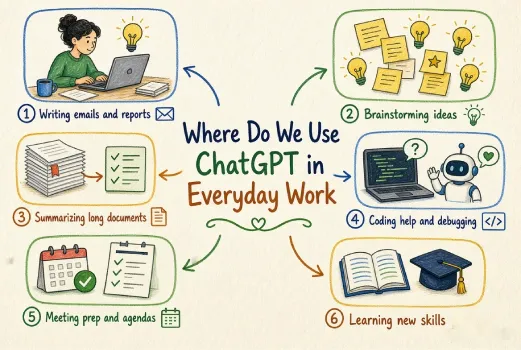
ChatGPT helps people in different activities where these patterns are repeated several times. The different ways are as follows:
Message and Email Writing: If you go through an AI draft, you will find that it is written smoothly with a high level of formality. Besides, it is quite structured in comparison to the majority of people having a natural flow of writing. At the time of proofreading, the change in tone is quite simple.
Writing A Document: ChatGPT follows policies and procedures with a clean format and writes similar phrases. You can see the difference when the general writing is free.
Fixing A Problem: Sometimes, it provides reasons with a lot of confidence.
Generating New Concepts: The ideas come out in classified and uniform divisions in general categories. Generally, human beings do not create ideas systematically.
Creating A Summary of Big Text: Organized summaries reduce nuance to a generic pattern, and the readers observe them.
Producing Format or Scripts: ChatGPT loves a pattern using right bullets, perfect divisions and a flow in writing.
Writing the Passage Again: AI rewriting tends to remove slang, casual comments, and blunt language with smooth and impartial business phrases.
What is The Reason Behind The Easy Identification of AI Usage?
Unusually Improved Output: As you cannot write in a formal style instantly, you observe an abrupt and clear presentation.
Sudden Shift in Vocabulary: A change in writing style from general to formal using words like ‘moreover’, ‘leverage’, and ‘ensure ’.
Quick Leap in the Pace of Writing: If someone posts polished content quickly, it creates suspicion in a reader.
Same Type of Phrase in Different Reports: LLMs apply the same phrases once more, and the managers see the same email template.
AI Creates the Same Pattern: ChatGPT has a pattern like the same opening style, bullet points, and phrases. But human writers fail to do it.
What are The AI Writing Traits of ChatGPT Users?
| AI Writing Trait | Why It Stands Out at Work | Solution |
| Excessive Formal Style | Doesn’t fit with the general pattern of chat | Apply a specific prompting method and modify the instruction. |
| Normal Phrases | Sounds like a template rather than for a situation. | Match the style of the past messages. |
| Same pattern | Members identify a similar tone in several emails. | Abbreviate it and use particular details you know |
| Perfect grammar | Really great for live office writing. | Apply prompt engineering. |
| Highly formatted answers | Shows AI includes every viewpoint. | Stop for a moment before replying, and revise the sentence. |
| Description without particular details. | Feels disconnected from the actual work. | Use a description of the assignment, stakeholders and genuine instances. |
People notice when the writing shows formality or striking symmetry. They are analysing the person, but the official chat is quick and human.
What are The Behavioral Indicators of ChatGPT Application in Office?
The behavioral indicators are as follows:
Abrupt Rise in the Pace of Production: Generally, a task taking several hours is finished in a few minutes. High-performing employees cannot increase it suddenly.
Instant Solution: Those who are facing problems, they get an instant solution. People suspect that AI has played a role in the solution.
Writing Big Paragraphs in the Right Format: The groups understand one another’s chat from a quick change in business-style paragraph.
Creating Formatted Reports: The right structure in an AI-guided script, template, framework, and report never matches the work pattern.
Changing writing pattern: A shift from a general message to a new plan using bullets is a basic jump for ChatGPT.
AI-Dependent on Minor Activities: If you fail to write an email without ChatGPT, it is revealed to colleagues.
How to Stop Your Writing From Sounding Like ChatGPT?
Certain principles of humanized writing are as follows:
- Mix Your True Voice with AI Production
Copied content cannot create an impression on a reader, and so, one must use ChatGPT for the basic content and then write using a personal style.
- Create A Summary of Your AI Content
You can share ideas quickly and write direct messages naturally.
- Write in A Descriptive Way
ChatGPT will never be able to add details like a human being through internal situations, genuine examples, people and timestamps. These are the signs of human-written content.
- Remove The Generic Filler
Delete something that sounds like AI by deleting formal phrases in writing and connecting with the reader directly.
- Split The AI Pace
Modify the length of lines, delete transitions completely and allow some friction in writing to create a human touch.
- Add Your Personal Opinion
AI presents a structure on the topic, and you offer the correction through personal feedback.
- Avoid AI in Emotional Content
Some types of content where you need to add your personal touch are opinion, apology, controversy, and sympathy.
If you can use ChatGPT in the right way, it will vanish completely. If you don’t apply effort, it will become visible to everyone.
AI applications are simple in particular areas; particularly, structure, pattern and pace stop matching as you work in general. Instantly, people observe certain red signals.
Example of AI Content and Human-Written Content
Let us share the applications of ChatGPT created using an AI tool.
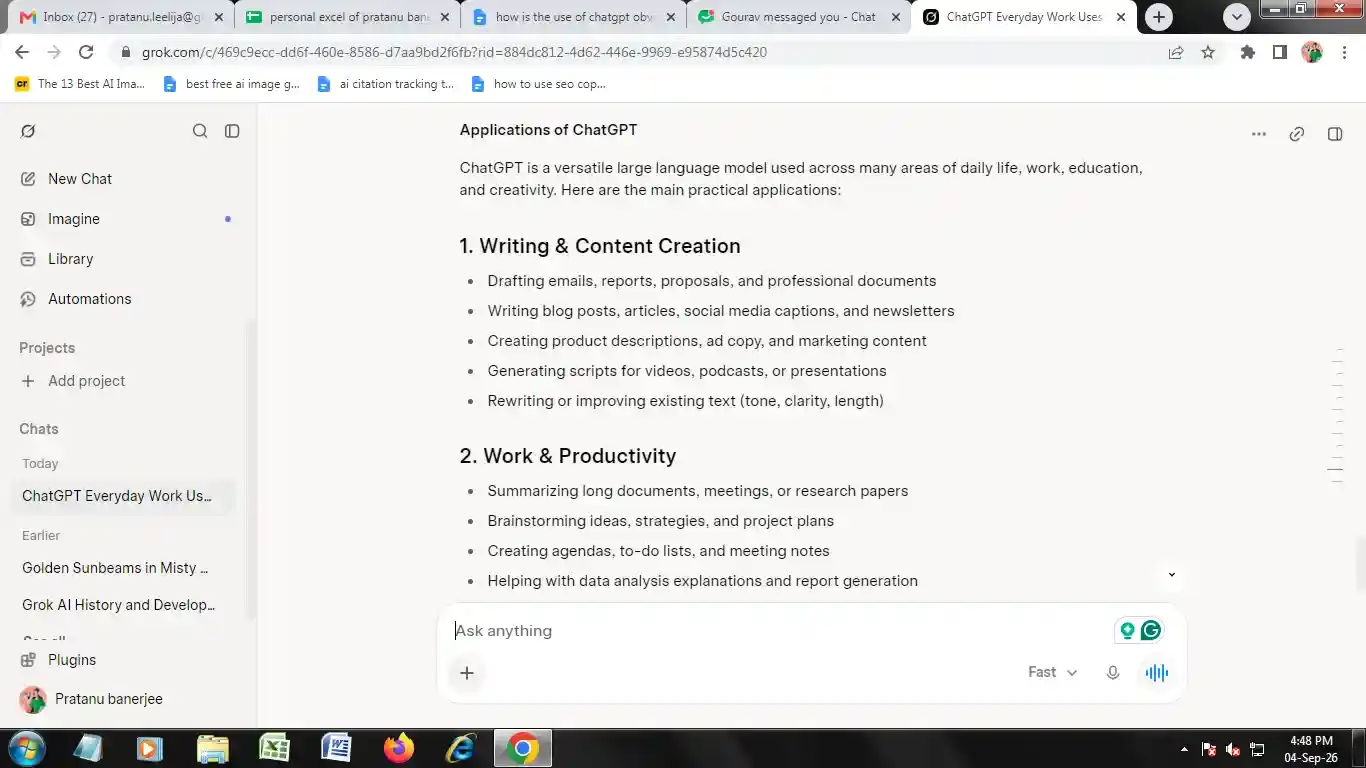
Now, if I write the above content in human style, then it will look like this:
The Uses of ChatGPT in Daily Life
ChatGPT offers variation as it is a large language model. It has been applied in professional and educational fields.
Some common applications of the tool are as follows:
- Creating Content and Writing
ChatGPT involves writing reports, emails and proposal writing. It helps in creating documents for different professions and is a tool for article and blog writing.
ChatGPT assists in creating headlines for social networking sites and newsletters. It helps in writing important information on different items, advertisement copy and marketing.
It is a great tool for writing scripts for PPT, podcasts, and videos. It enhances a passage for boosting the length, clarity, and writing style.
- Output and Homework
ChatGPT produces a summary of long passages, research projects and meetings. It helps in creating new concepts, plans and assignments. The tool helps in generating plans, lists and valuable notes of the meeting. It conducts analysis and creates reports.
When I checked the above content on Zerogpt.com, it showed the result:
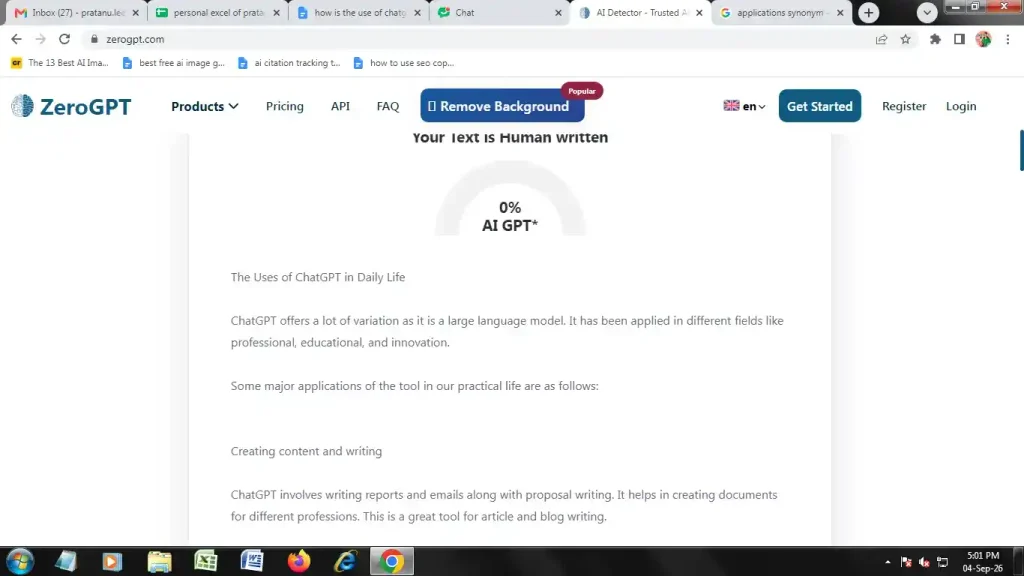
This shows that the above content is completely human-written.
Conclusion
Everyone knows the application of ChatGPT in the office. These indicators are a formal style of writing, transition phrases, a generic pattern, an absence of description, and an absurd volume of output. That’s the way ChatGPT use becomes apparent at the office. The right way for the present workplace is to apply AI for the basic generation of ideas and planning. At the same time, it guarantees that the human voice changes the outcome.
FAQ
Do Employers Tell if The Employee Uses ChatGPT Officially?
At times, employers observe the application of ChatGPT in written content and absurd modifications in the standard of writing.
What are The General Indicators of ChatGPT in Official Content?
The general indicators are the same structure of sentences, improved language, bullet points, and excessive headlines.
Can ChatGPT-Enabled Emails be Pointed Out?
Content looks AI-generated if it writes generically or formally. Content editing improves the natural style of communication.