


Google AI Studio is a browser-based development environment for building and testing applications using Google’s Gemini large language models. Instead of utilizing sophisticated programming languages, it allows for quick deployment via instructions and fine-tuning.
Table of Contents
What is Google AI Studio?
Google AI Studio is a browser-based, readily accessible platform that allows developers to develop applications and software using Google Gemini models, such as 1. 5 pro and 2. Users can provide prompts using text, images, audio, or video. It works with Google Cloud and Vertex AI to help you turn prototypes into production applications. Its key advantages include seamless end-to-end operations, data security, and the generation of API keys without writing code.
How to Start Using
Beginners can easily start using Google AI Studio. Here’s a step-by-step instruction for accessing the Google AI Studio:
Step 1: Go to aistudio.google.com and log in with your credentials, i.e., your Google account. Since it is a browser-based platform, you won’t have to install it.
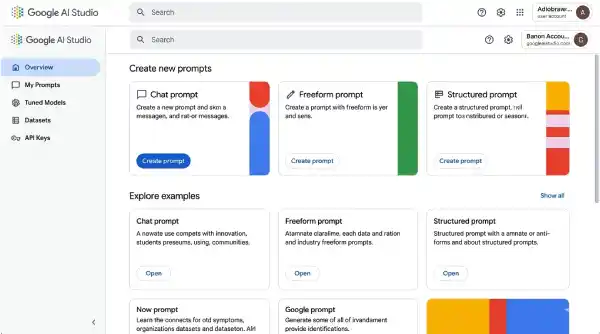
Step 2: Once you log in, you can find five actions on the left sidebar: “Overview”, “My Prompts”, “Tuned Models”, “Datasets”, and “API Keys.”
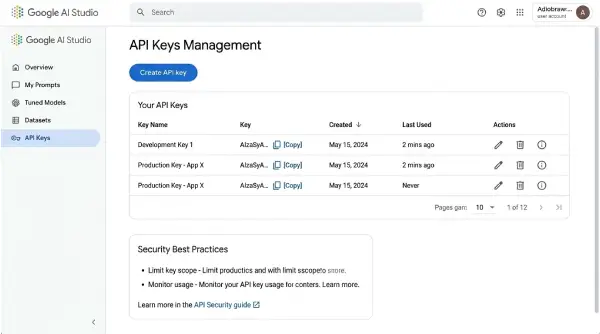
Step 3: Clicking on “API Keys” allows users to open the API Keys management page, where users can create new keys with the “Create API Key” button. If you have a free plan, you can request from 5 to 15 times per minute, depending on the model. Upgrade the plan to a paid one for a higher range of requests.
Which Models are Suitable for Google AI Studio
There are several models available in the Google AI Studio, among which you have to choose depending on your task. Whether you are generating applications or software, Google AI Studio has different models for automating your job.
Gemini 3 Series
Gemini 3 pro ranks at the top among AI models for multi-step thinking, scoring 1501 on the Elo leaderboard. The model can adjust the thinking level depending on the task at hand. The Gemini 3 pro image, now called Nano Banana Pro, can generate up to 4k images with clear texts in them, while most other models fail to do so. If you are generating an application that requires Google Maps, use Gemini 2.5 Pro, as Google Maps is not available in the Gemini 3 models.
Gemini 2.5 Series
The Gemini 2.5 Pro is built for more complex tasks with longer thinking capability. Unlike the Gemini 3 pro, it is compatible with Google Maps. It has two variants: Gemini 2.5 Flash and Gemini 2.5 Flash Lite. The Gemini 2.5 flash generates outcomes faster than regular pro models, while Gemini 2.5 flash lite is built for fast outcomes for relatively simpler tasks.
Choosing the Right Model in the Google AI Studio
Different Gemini models in Google AI Studio are optimized for different tasks. Programmers recommend starting with Gemini 3 pro for coding, mathematical, or reasoning problems. If you need the Google Maps feature, you can switch to Gemini 2.5 Pro. Gemini 2.5 flash and Gemini 2.5 flash lite are best for everyday tasks.
How to chat with the AI model
You can test prompts with visual controls for each parameter in the prompts tab. When you discover anything functional, you may export the entire setup as code, adjust settings, and turn tools on and off.
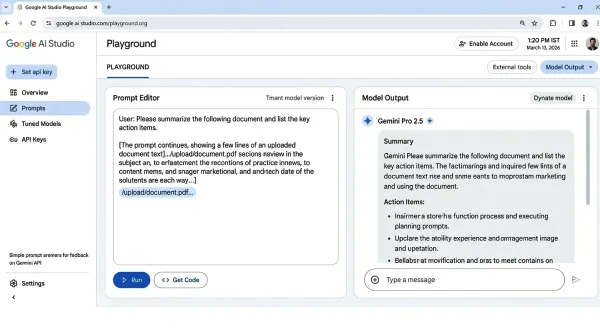
System instructions define the model’s behavior throughout your chat, so you don’t have to repeat the same context in each prompt. Temperature determines how random replies are generated: lower levels around 0.3 result in consistent formatting, whilst higher values around 1.5 work better for creative writing. The thinking level choice on Gemini 3 models allows you to trade between reasoning depth and quickness.
If you wish to create photographs instead of text, change the model to Nano Banana Pro in the top dropdown. The same parameter options apply, but the photos will be at 2K or 4K resolution with clear and understandable text.
AI Studio Stream Mode
The stream mode allows the user to have a conversation with Gemini in real time without typing. The user needs to share the screen and talk through a microphone.
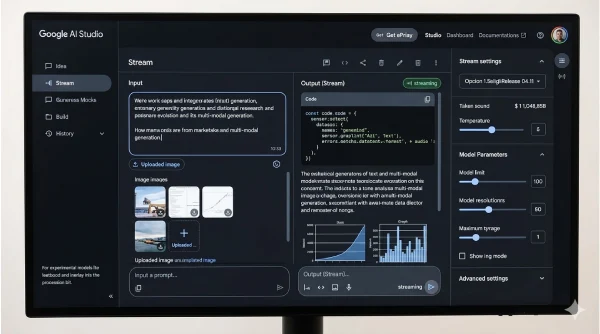
There are three options to talk with Gemini- you can talk through your microphone, allow webcam access to show you, or share your screen with Gemini.
Gemini can automatically recognize your voice. It waits for you to stop before answering, allowing you to think about your explanation without clicking anything between rounds. The model simultaneously processes your speech, any video from your webcam, and whatever you’re exhibiting.
Build Mode
The build mode allows users to generate outcomes from prompts. Nicknamed “vibe coding” by Google, it generates code for a new application or software from prompts.
Other Alternatives to Google AI Studio
| Platform | Free Tier | Paid Tier | Key Strengths | Best for |
| Google AI Studio | 5-15 messages per minute | $7.99/month | Build Mode, Stream Mode, Google Maps | Prototyping, code generation, experimenting with Gemini |
| ChatGPT | The latest model allows users to input 10-60 messages/5 hours | $20/month | Memory, plugins, mature ecosystem | General tasks |
| Claude AI | 20-40 messages/day | $20/month | Artifacts, projects, etc. | App prototyping, coding assistance |
| Grok AI | 2-10 prompts/2 hrs | $40/month | Real-time X data, Aurora images | X integration, lightweight use |
Conclusion
Google AI Studio has three different modes of operation- generating outputs through prompts, building apps in build mode, and interacting with gemini in the stream mode. It allows you to generate complex code for an app or software without needing to learn complex LLMs.
Rapid prototyping is one of AI Studio’s key strengths. When an idea works, you may test it in Chat mode, develop it in Build mode, and finally export the code. The typical friction is eliminated by the browser-based interface, but for production use, appropriate API connectivity is still required.
Frequently Asked Questions
What is Google AI Studio?
Google AI Studio is a free, browser-based platform for prototyping with Google’s Gemini AI models. It has three modes: stream mode for voice and video interactions, build mode for building React apps from natural language, and chat mode for testing prompts.
Is Google AI Studio free to use?
Yes, Google’s Gemini 2.5 pro models are free to use. No credit card is required. Only Gemini Pro 3 models are paid for; the subscription costs around $2/1M input tokens.
How is Google AI Studio different from ChatGPT?
With features like Build Mode for creating React apps and Stream Mode for voice and video interactions, Google AI Studio is primarily focused on development and experimentation. With cross-session memory and plugins, ChatGPT provides a more developed environment. While ChatGPT is better suited for common activities and established workflows, AI Studio is best suited for multimodal prototyping using Gemini Models.
Do I need to be an expert developer to use Google AI Studio?
No, you don’t need to be an expert to use the Chat mode and stream mode. However, having some prior knowledge of coding helps in the build mode. The platform is designed to be user-friendly for both developers and non-technical users.