

Want to create high-quality videos? The AI tools for video creators are quite popular and they improve the standard of video.
The AI tools for video creators are platforms producing high-quality videos. It enhances the voiceover and improves the video script. These tools are useful for youtubers, marketers, agencies and video creators. Some tools can modify the background while others create the best animation. It helps in the creation of an ideal video footage.
In this Ainewsjournal article, I will explore 17 AI tools for the creators of video.
Go through this article to know about the unique facts about AI video editors.
Table of Contents
Different Types of AI Tools for Video Creators
Based on the different activities of editing, we have come across different AI video creation tools.
AI Voiceover Tools
The AI tools helping in voiceovers are as follows:
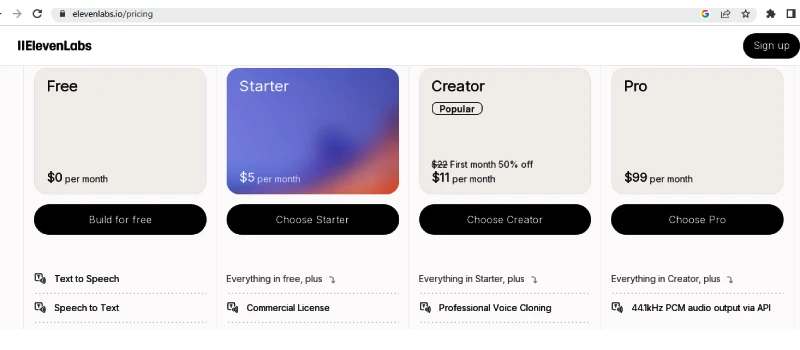
1. ElevenLabs
What it does: ElevenLabs is an AI tool for cloning and voice generation. You can get a voice library with a multilingual range. It helps the video editor to export, edit and create visual content and audio.
Best for: Gaming, audiobook narration, AI translation and dubbing, voice cloning, and AI voiceovers.
Pricing:
Pros:
- Unique realism.
- High-quality cloning of voice.
- Guidance in different languages.
- Generates video quickly.
- API has high quality.
Cons:
- Expensive to create several videos.
- Restricted monthly limits.
- The generation is quick, but for long content, it takes 10 to 20 hours.
Rating:
- On the basis of the reviews of Capterra New Zealand, the rating is 4.7
- Based on Google Play store, the rating is 4.6.
2. Murf.AI
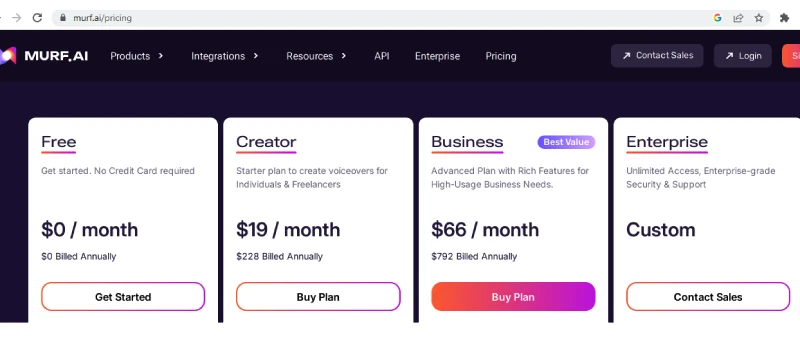
What it does: Murf.AI indicates a text-to-speech website having more than 120 AI voices, which seem quite natural. There is a combination of voice-over video, voice cloning using AI, and a storehouse of background music.
Best for: Video narration, audiobook production, product demo and content localization.
Pricing:
Pros:
- Natural voice
- The platform is user-friendly
- Tools for modification
- Quick workflow.
Cons
- Restricted free plan.
- Emotional and pronunciation restriction.
- Slow output.
Rating: Based on the reviews of TrustPilot, the rating is 4.7 .
3. Capcut
What it does: Capcut is a high-quality AI-supported video editor. It offers slicing and fundamental trimming of video. The editor can remove the background and add auto captions. There is a script-to-video conversion, which is remarkable for veteran and new editors.
Best for: Youtube Shorts, Instagram Reels and TikTok.
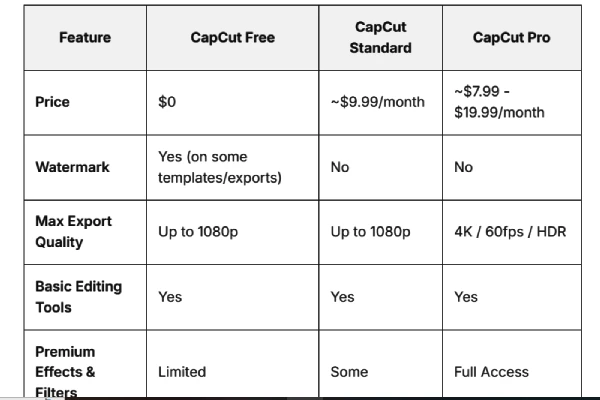
Pricing:
Pros
- In-built features
- Sophisticated AI tools
- Suitable for desktop and mobile.
Cons
- It might lag or crash on old mobiles.
- Restriction in professional editing.
- Advanced AI features are available in paid versions.
Rating: Based on the review of ProductHunt, the rating is 4.4.
AI Scriptwriting Tools
A video needs a good script, and these AI tools will help in scriptwriting. They are as follows:
4. InVideo AI
What it does: Invideo.ai is a text-to-video generator which permits people to produce full videos through a prompt. It is an AI-powered video software offering stock media library, avatars, voiceovers, and AI editing.
Best for: Ads, youtube and social media content.
Pricing:

Pros:
- Quick production.
- Anybody can create videos.
- Big library of stock assets.
- Different types of templates.
- High-quality AI facilities
Cons:
- Content lacks authenticity.
- Restricted free version.
- Rendering is quite slow.
Rating: On the basis of the rating of TrustPilot, the rating is 4.1.
5. Synthesia
What it does: Synthesia is a popular video creation website. It permits people to generate professional videos simply from text within a few minutes. There is no need for actors, microphones, or cameras.
Best for: E-learning, marketing, corporate communications, etc.
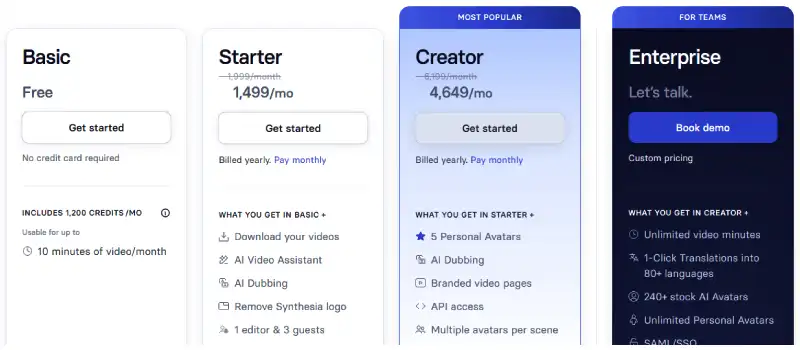
Pricing:
Pros:
- It saves cost and time.
- One can use it for more than 120 to 140 languages with their accents.
- There are different forms of humans like avatars.
- The interface is simple and user-friendly.
Cons:
- Restricted emotional expressions.
- The premium features are quite costly.
- Problems in lip syncing.
Rating: Based on the rating of TrustPilot, the rating is 4.0.
6. Jasper AI
What it does: Jasper AI is a popular AI platform for businessmen and marketing groups to speed up content generation. It creates content for social media, email, ad copy, and blog posts.
Best for: Product description, SEO and marketing copy.
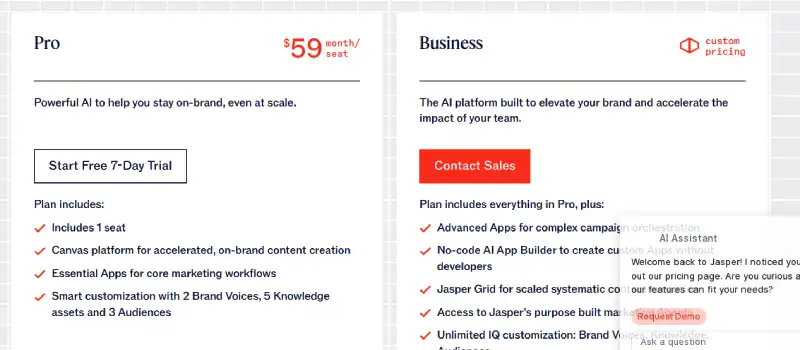
Pricing:
Pros
- Jasper AI offers excellent content with a brand voice.
- More than 50 templates for SEO, social media, ads, and blogs.
- Assists in 30 languages and works in collaboration with marketing websites.
- Improves the pace of content creation.
Cons
- It is expensive.
- Need editing.
- Chances of committing mistakes or being repetitive.
- One needs time to learn high-level features.
Rating: Based on the rating of TrustPilot, the rating is 3.4.
AI Thumbnail Creation Tools
A thumbnail is an important part of a video. There are innovative AI tools for producing thumbnails, and they are as follows:
7. Pikzels
What it does: Pikzels is an AI website for producing top-quality titles and thumbnails for YouTube easily. It offers faceswap technology with multilingual support.
Best for: Thumbnail generation, Faceswap technology, remaster present thumbnails, and AI title generation.
Pricing:

Pros
- Faceswap technology is a unique feature.
- Producing attractive thumbnails quickly.
- Simple editing facility.
- Pikzel score examines a thumbnail to understand its emotion, curiosity, and virality.
Cons
- The logo and text show spelling errors andan incorrect representation of the logo.
- The cost of credit is quite high.
- Restricted customization.
Rating: Based on the rating of TrustPilot, the rating is 4.7.
8. Wayinvideo
What it does: Wayinvideo indicates an AI-supported website created for turning long videos into short ones. It produces short clips for Instagram and YouTube.
Best for: Gaming clip creation, AI supported thumbnail generation, AI video summarization, and viral short clips.
Pricing:
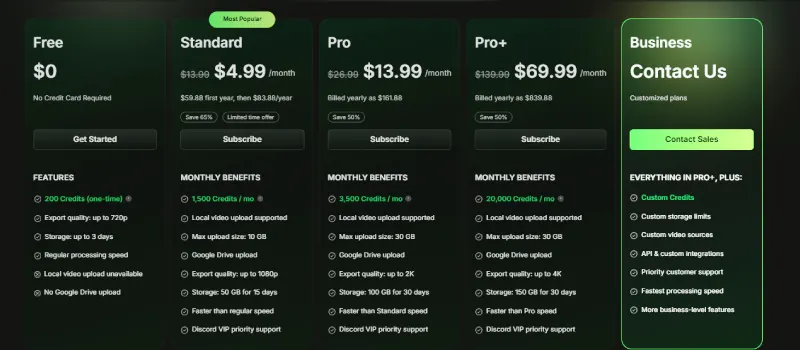
Pros
- One can create content quickly.
- The website is user-friendly.
- The total number of stock assets is more than 16 million.
- Consists of AI voiceover and text-to-speech features.
Cons:
- Restricted modification.
- Problem in editing several images and videos.
- It needs an internet connection with high speed.
- The paid version is costly.
Rating: Based on Chrome Stats, the rating is 4.69.
9. vidIQ AI
What it does: vidIQ AI indicates an AI-supported tool as well as an extension in the browser. It acts as an AI coach, an AI content generator, a thumbnail generator, a keyword research tool, and a competitor analysis.
Best for: Shorts creation, trends alert, AI channel coach, thumbnail generator, and AI video scripting.
Pricing:
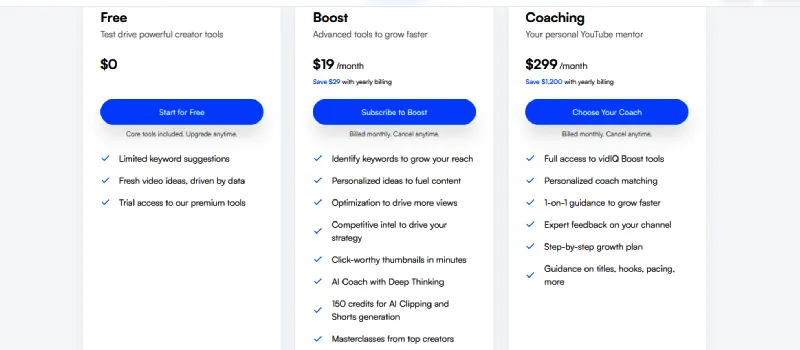
Pros
- Creating content using artificial intelligence.
- Assists in finding keywords with low competition and high traffic.
- Personal style of training.
Cons
- The free plan is restricted.
- It takes time to learn the tool.
- The content is not creative, and it is often lengthy.
- The advanced features are quite costly.
- The thumbnail design is not attractive in comparison to other tools.
Rating: On the basis of the rating of TrustPilot, the rating is 4.3.
AI Cinematic Effect Tools
In order to create cinematic effects in a video, you can use the following AI tools:
10. Higgsfield AI
What it does: Higgsfield AI presents a generative AI video website for producing videos with top-quality cinematic shots. One can create controllable videos using sketches, images, and text.
Best for: Marketers and creators.
Pricing:
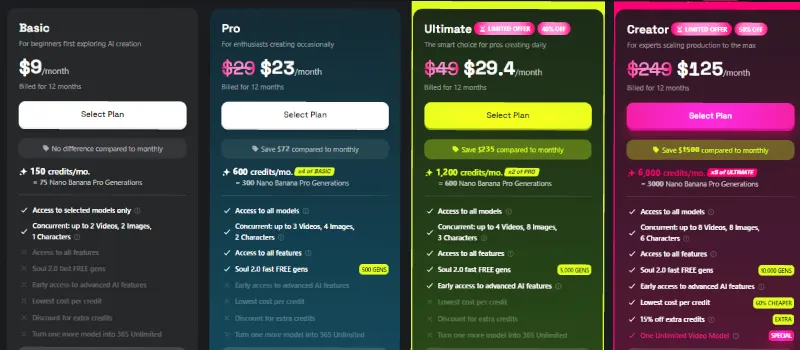
Pros
- The production has a high standard.
- It has features like talking, avatars, and lip syncing.
- The platform is good for an ordinary man.
- There are different types of models.
- This is good for content creators on social media.
Cons
- The credit system is costly.
- The free plan is restricted.
- The user needs time to learn the advanced features.
Rating: On the basis of the rating of TrustPilot, the rating is 3.8.
11. Mocha Pro
What it does: Mocha Pro presents a VFX and planar tracking software. After production, it offers stabilisation with face detection, object brush, and refine solve. It offers object removal and advanced rotoscoping.
Best for: 360/VR Post-Production, 3D camera solving, screen inserts, rotoscoping, and planar tracking.
Pricing:
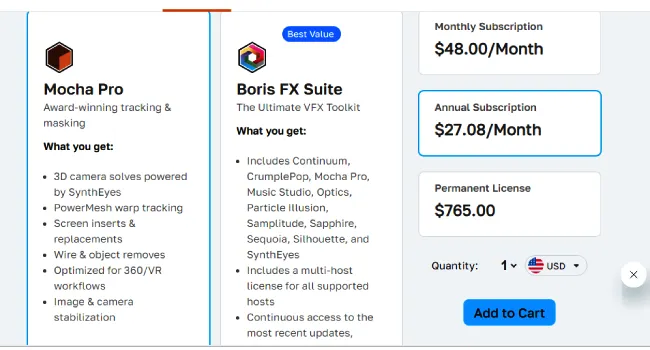
Pros
- Superior planar tracking.
- Face detection.
- High-quality AI tools
- Rotoscoping and robust masking.
Cons
- It takes time to learn.
- The cost is really high.
- It is tough to do simple activities.
Rating: Based on the rating of Capterra, the rating is 3.5/5.
12. Topaz Video AI
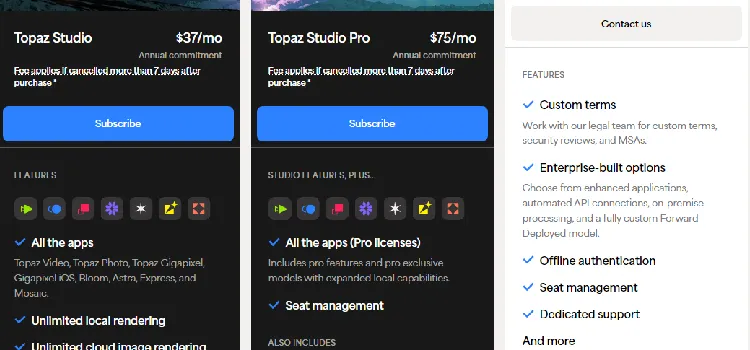
What it does: Topaz Video AI is a popular application for improving and conserving a video with the help of highly sophisticated AI models. It has frame interpolation and motion deblur.
Pricing:
Pros
- Improved restoration and upscaling.
- Processing is local.
- The slow motion is quite smooth.
- AI models are available for various scenarios.
Cons
- This is quite costly.
- It is based on resources.
- It takes time to learn.
- In low resolution, it is not effective.
Rating: On the basis of the review of the users, the rating of Topaz Lab is 3.9/5.
AI Video Subtitle Tools
There are different AI platforms for creating video subtitles, and they are as follows:
13. Kapwing AI
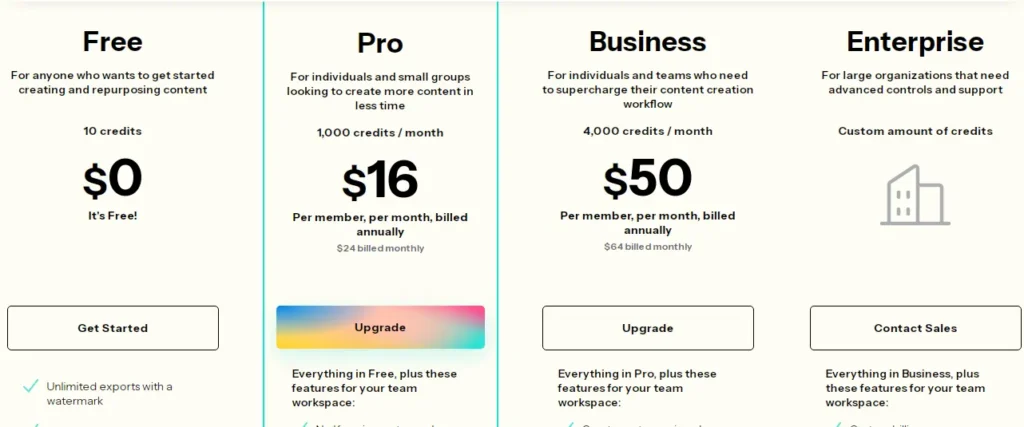
What it does: Kapwing AI is a video creation website using AI. It is created for enhanced editing using automated tools. They are smart subtitles, text-to-video generation, and removal of filler words.
Pricing:
Pros
- This is an AI-supported tool.
- Comfortable.
- Content repurposing.
- Joint effort using the cloud.
Cons
- The premium plan is costly.
- Problem with autosaving leading to loss of assignment.
- Advanced features are restricted.
- The website might be complicated or slow.
Rating: Based on the user reviews on TrustPilot, the rating is 2.3/5.
14. Maestra AI
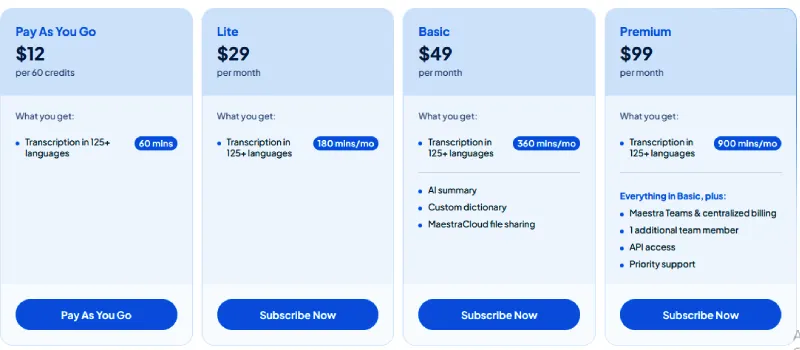
What it does: Maestra AI indicates a comprehensive website using a browser, which uses AI for quick and precise transcription, subtitling, and translation. For audio and video, there are voiceover services.
Pricing:
Pros
- High-standard translation and transcription.
- Holistic tools for localisation.
- Remarkable customer care.
Cons:
- The subscription is quite costly for a normal person.
- There are restrictions due to complicated audio or strong accents.
- You will find problems in following the cost of subscription.
Rating: Based on the reviews of TrustPilot, the rating is 3.6.
15. SubtitleBee
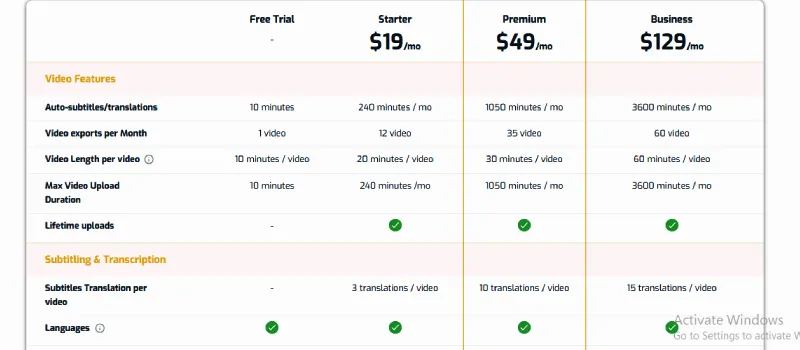
What it does: Subtitlebee represents a subtitle generator for auto video using style and precision.
Pricing:
Pros
- Precise and quick AI.
- Helps people in more than 120 languages.
- Presents excellent styling tools.
- User-friendly design.
- Saves a lot of time in comparison to the manual mode of transcription.
Cons
- The free version is restricted.
- Problem with noise at the background and needs to be edited by hand.
- Restricted alternatives for exporting videos in various formats.
- Customer care is slow, and the process of cancellation is tough.
Rating: On slashdot, based on the review of users, the rating is 5/5.
AI Colour Grading Tools
16. ColourLab AI
What it does: Colourlab AI is a software for colour grading created in Hollywood, which uses artificial intelligence. It takes help from machine learning. It makes the shot matching and color correction automatic for film directors.
Pricing:

Pros
- Saves a lot of time.
- Smooth integration.
- Excellent colour management.
- Regularity.
- AI-supported matching.
Cons
- Quite expensive.
- Lacks a clear idea of colour science.
- There are a lot of errors.
Rating: Based on the review of Autonoly, the rating is 4.5/5.
17. DaVinci Resolve
What it does: DaVinci Resolve is a holistic software for post-production, which includes correction of colour, editing, motion graphics, VFX, and audio post-production within one application. It is applied in streaming content, television shows and feature films.
Pricing:

Pros
- The free version is quite strong.
- Colour grading has an industry standard.
- Presents effects, colour, editing, and audio in a single application.
- Shows more stability and speed in comparison to competitors.
Cons
- The beginners need time to learn.
- It needs a computer with high output, with remarkable RAM and GPU.
- As it is complicated, it might spoil productivity.
- The timeline management shows less flexibility.
Rating: In TrustRadius, the rating is 9.4/10.
Importance of AI Tools for Content Creators
Before going into the features of the popular AI tools, let us talk about their features in general.
1. Creation of content and generative video
This includes the text-to-video creation, AI avatars, and image-to-video creation with animation.
2. Innovative post-production and editing of video
One can get editing based on text, and trimming and screen detection is automatic.
3. Audio improvement
The AI voiceovers are available in different accents and languages.
4. Modification and using in different ways
These tools will help in the conversion of long-form to short-form videos.
Future of AI Video Creation
The future of creating AI video is as follows:
- The content will be regular and hyperrealistic. The tools will create cinematic clips of 10 to 15 seconds.
- The systems in the future will analyse deep emotional refinement. It will permit creators to develop particular psychological conditions. There will be excellent relationships among the AI avatars.
- There will be the application of CGI, visual effects using AI, along with voiceover. Even individual creators and small groups will be able to do it.
Conclusion
Video editing AI platforms are websites for video production. The beginners can use CapCut. For enterprise training, synthesia AI is quite useful. DaVinci Resolve is the best video editing website for filmmakers. The InVideo AI is an excellent tool for marketers. We have explored the pros and cons of 18 AI tools under different categories. These categories are voiceover, scriptwriting, thumbnail creation, cinematic effect, video subtitle, and colour grading. Among these innovative tools, InVideo AI and Higgsfield AI are the two favourite video editing tools.
Thank you for reading the blog. Share this blog with your friends.
FAQs
Is CapCut or InShot better?
Capcut presents features on trends, quite advanced, strong AI tools, and social media templates. On the other hand, InShot offers a simple interface, which is perfect for instant and perfect editing. It also edits photos.
What is the 321 rule of video editing?
In Video editing, the 3-2-1 rule indicates a data backup plan rather than an editing method. One must have three total copies of the data and keep them in two ways. An individual should keep one copy off-site to protect against disaster, theft, or failure.
What do most YouTubers use to edit their videos?
Youtubers take the help of different software for video editing. They are Final Cut Pro, DaVinci Resolve, Adobe Premiere Pro and these softwares are meant for complicated assignments. Capcut, Canva and iMovie are user friendly.
What is the 80/20 rule in video editing?
The 80/20 rule indicates the imbalance between output and input. We need to follow those activities, which are the top priority. The strategy involves 20% resources. We need to give time. It will give 80% of the outcome.